How to Ban Yourself from DraftKings, FanDuel & Every Other Betting App
Need help now? US: call or text the National Problem Gambling Helpline at 1-800-MY-RESET (1-800-697-3738). UK: GamCare 0808-8020-133. Free, confidential, 24/7.
How to ban yourself from DraftKings & FanDuel — the quick answer
Banning yourself from one sportsbook leaves the others open, and other licensed apps are one tap away. Four layers help: 1) operator self-exclusion inside DraftKings, FanDuel, BetMGM and Caesars (look in the account's Responsible Gaming section), 2) delete the apps + iOS Screen Time restrictions with a passcode someone else holds, 3) block every betting app on your phone, not just one brand, and 4) your state's self-exclusion program, where one registration typically covers every licensed operator in the state. If you only want to shut off the casino side and keep sportsbook, read this first: at DraftKings and FanDuel, an exclusion covers every product. This is the brand-specific walkthrough; it's one piece of the full how to stop gambling system.
Why blocking one sportsbook never works
A common first move is to delete DraftKings, feel the relief, and bet on FanDuel by the weekend. In states with legal mobile betting, your phone can reach several licensed sportsbooks in seconds, and new accounts often come with a promo. Blocking a brand while the category stays open isn't a block; it's a detour. So this guide works brand-by-brand and category-wide: shut your accounts properly at each operator, then make the whole category unreachable on your device and in your state.
Layer 1 — Self-exclusion and account closure at each operator
Operator self-exclusion locks you out of that brand's products for the period you choose. Two rules before you start: withdraw your full balance first (once excluded you generally can't log in, and getting money out can mean going through support), and pick the longest period offered. Some states, such as Virginia, also seize winnings from bets placed while you're excluded. Treat self-exclusion as permanent, not as a countdown to coming back. These steps were checked in November 2026 and flows change, so confirm them on the operator's responsible-gaming page.
DraftKings
- Self-exclude: in the Sportsbook or Casino app, tap your profile picture → Responsible Gaming → Patron Protection Center → Self-Exclusion, then follow the steps for your state. DraftKings' self-exclusion page lists terms of 1 year, 3 years, 5 years or lifetime, depending on the state, and says the exclusion applies to all DraftKings products. If you can't find it, contact DraftKings support and ask them to self-exclude you.
- Close the account: withdraw first, then close it under Login & Security or Account Information, depending on the app, or ask support. DraftKings describes closure as permanent. Self-exclusion is a separate step, and DraftKings says it can't shorten a term once it's set.
FanDuel
- Self-exclude: log in and open the Responsible Gaming or User Tools section of your account, then choose Self-Exclusion, pick a period and submit. FanDuel's self-exclusion page says either a timeout or a self-exclusion on one product also applies to your other eligible FanDuel products. FanDuel offers a Timeout (a shorter break) and Self-Exclusion (lengths vary by state, often starting at one year). Choose self-exclusion, not the timeout, if you want to stop.
- Close the account: withdraw first, then Account → Settings → Account Controls and Closure → Deactivate, or ask support to close it for you.
BetMGM, Caesars & the rest
Look for the same thing at each one: the Responsible Gaming section of your account (My Account at BetMGM and Caesars), or a message to support saying "I want to self-exclude." Available periods vary by operator and state (Caesars in New Jersey lists 1-year and 5-year terms). Do it for every account you hold, because an open account anywhere is an open door.
Can you disable casino on FanDuel and keep the sportsbook?
Usually not, at either company. A slot spin ends in seconds, so wanting the casino gone while you sort out the rest makes sense. The two operators' own rules get in the way.
What their rules say (checked November 2026): FanDuel says a timeout or self-exclusion on one product also applies to your other eligible FanDuel products. DraftKings says a limitation or self-exclusion applies to all DraftKings products, whichever one you set it from. So excluding yourself from the casino normally closes the sportsbook too. You can ask support what your state allows: "Can I self-exclude from casino only, not sportsbook?" The answer may be no.
Some state programs are split up. Pennsylvania runs separate lists for casinos, online gaming (which includes online sports betting), video gaming terminals and fantasy contests, so ask what each list covers when you register.
If the casino is what worries you and a brand-wide exclusion feels like too much today, you can still delete the casino app and call the helpline at 1-800-MY-RESET to talk it through. If you keep ending up back on the slots through the same account, that is useful information and no personal failing. It points to excluding from the whole brand.
Layer 2 — The iOS layer: delete + Screen Time
Closed accounts stop today's version of you. Screen Time stops the 11pm version who's tempted to open a new one:
- Delete every betting app from your iPhone.
- Set a Screen Time passcode that someone you trust holds — not you.
- Use Content & Privacy Restrictions to block gambling sites in Safari and prevent app reinstalls.
That's the short version. This page is the brand-specific walkthrough. For the full device setup (domain lists, App Store locks, dedicated blockers), follow the generic iOS guide: how to block betting sites on iPhone.
Layer 3: Block every betting app, not one brand
This layer goes after the "delete DraftKings, download FanDuel" loop. iOS has no betting category you can switch off, but the Screen Time app age limit comes close: it hides every app rated above your limit, and real-money betting apps carry the App Store's top rating. That includes apps you haven't heard of yet, along with any other app rated above the limit.
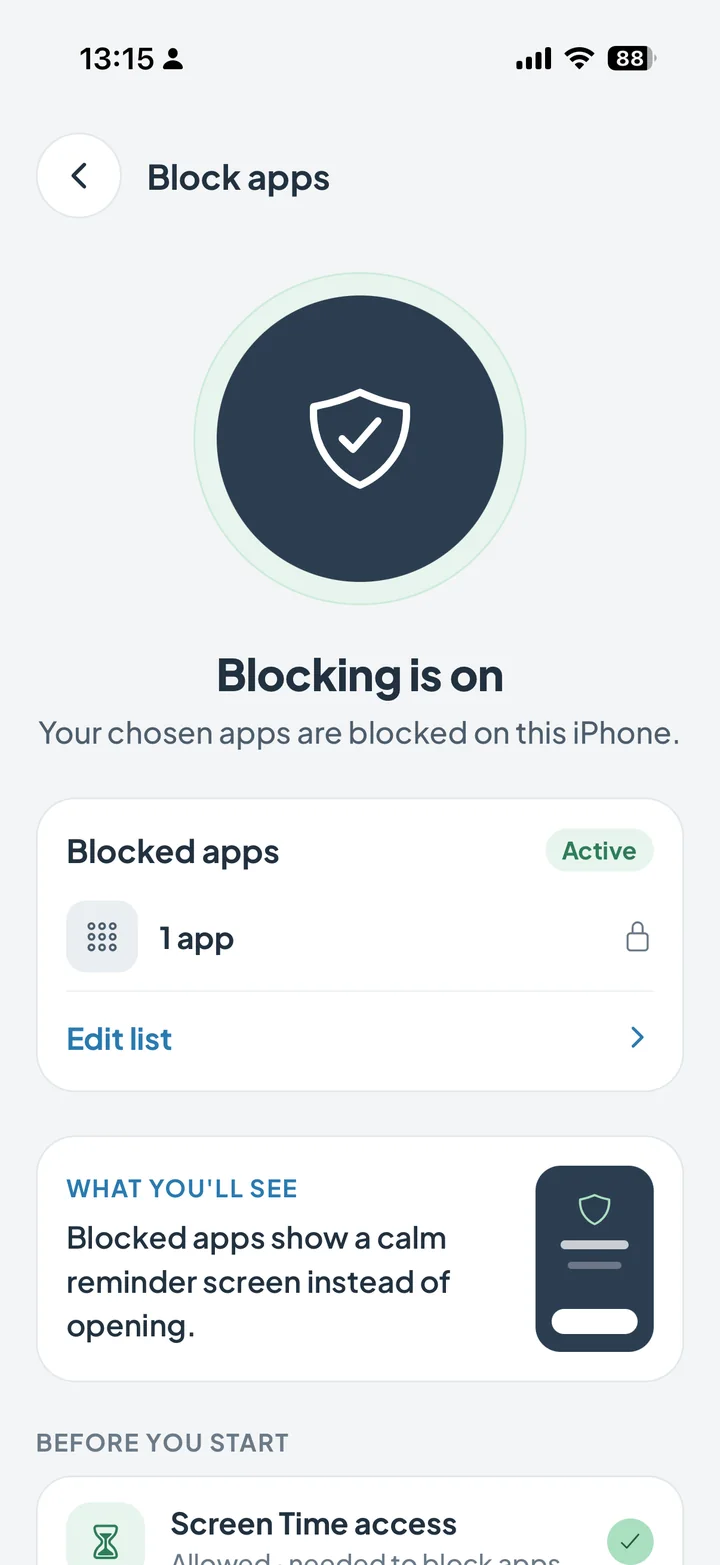
In NoGambling.app, one switch blocks the betting apps you choose and popular gambling sites in Safari for your region (iOS 16 or later). You can switch it off yourself, so it works best with the passcode in Layer 2. It also adds what a block alone can't give you: a real-time streak counter, and a panic button for the moment an urge hits.
Layer 4: State self-exclusion, one register for licensed operators
Many US states with legal betting run a voluntary self-exclusion program, and one registration typically covers every operator licensed in that state, such as DraftKings, FanDuel, BetMGM and Caesars, often online and retail together. Licensed operators then have to keep you out for the exclusion period. It usually won't reach offshore sites, sweepstakes casinos or prediction markets, and some states make you enroll in person, as Illinois does. Find your state's program, helpline, and local resources here: quit gambling by state.
Choose the longest term your state offers.
The psychology: blocks hold the door, urge tools clear the room
No block on this page is foolproof, so pair them with urge tools. A block's real job is to buy you time, because urges rise, peak and fade with time. How long varies. The 6-step panic button paces you through a look at your streak and your debt, 4-4-4 breathing, a motivation card, and rating the urge. If you need a person, call or text 1-800-MY-RESET. For the full quit plan around game days and paydays, see how to stop sports betting.
And once the apps are gone, the next question is usually the money they took — start here: how to recover money lost to gambling (spoiler: forward, not by chasing).
Resources & helplines
- US, National Problem Gambling Helpline: call/text 1-800-MY-RESET (1-800-697-3738), 24/7. Your state self-exclusion program typically covers all licensed operators at once.
- Operator responsible-gaming pages — DraftKings, FanDuel, BetMGM, and Caesars each publish current self-exclusion and account-closure steps for your state; check them for exact flows.
- UK, GamCare: 0808-8020-133, plus GAMSTOP, which blocks your accounts at participating online gambling companies.
- Gamblers Anonymous — free meetings in person and online.
FAQ — banning yourself from DraftKings, FanDuel & betting apps
How do I ban myself from DraftKings?
Withdraw your balance first. Then, in the Sportsbook or Casino app, tap your profile picture, then Responsible Gaming, Patron Protection Center and Self-Exclusion. Choose the longest period offered and confirm. DraftKings says it applies to all its products, whichever one you set it from. If you can't find the option, contact support and say you want to self-exclude. For a ban that reaches beyond one brand, register with your state's self-exclusion program too. That typically covers every operator licensed in the state.
Can you disable casino on FanDuel and keep the sportsbook?
Usually not. FanDuel says a timeout or self-exclusion on one product also applies to your other eligible FanDuel products, and DraftKings says the same for its products. So excluding yourself from the casino normally closes the sportsbook too. You can ask support what your state allows, but the answer may be no.
How do I block the DraftKings app on my iPhone?
Four layers: self-exclude inside DraftKings (Patron Protection Center, Self-Exclusion, or via support), delete the app and lock reinstalls with an iOS Screen Time passcode someone else holds, set an app age limit so the other sportsbooks are hidden too, and register with your state's self-exclusion program. No layer is foolproof, but together they put more time between an urge and a bet.
How do I delete my DraftKings account permanently?
Withdraw your balance first. Then close it under Login & Security or Account Information, depending on the app, or ask DraftKings support. DraftKings describes closure as permanent and says you can't log in afterward. Self-exclusion is a separate step that locks you out of all its products for the period you choose. Check DraftKings' responsible-gaming page for the exact current steps in your state.
How do I self-exclude from FanDuel?
Log in and open the Responsible Gaming or User Tools section of your account. FanDuel offers a Timeout (a shorter break) and Self-Exclusion (lengths vary by state, often starting at one year). Withdraw your balance first, choose the longest period you can, and treat it as permanent. It also applies to your other eligible FanDuel products. If you can't find the option, contact FanDuel support or check their responsible-gaming page.
Is there one app that blocks all sports betting apps?
No app can promise to block every one. On iPhone, the closest thing is an iOS Screen Time app age limit (with a passcode you don't hold), because real-money betting apps carry the App Store's top rating. A dedicated blocker adds gambling sites. In NoGambling.app, one switch blocks the betting apps you choose and popular gambling sites in Safari (iOS 16 or later), and it adds streak tracking and a panic button for the urges blocking can't handle.
Does self-excluding from DraftKings block FanDuel too?
No. Operator self-exclusion covers only that brand's products. That's why registering with your state's self-exclusion program matters: it typically covers every operator licensed in that state at once. It usually won't reach offshore sites, sweepstakes casinos or prediction markets, so add device-level blocking for those.
Should I withdraw my money before self-excluding or closing my account?
Yes, withdraw your full balance first. Once self-exclusion starts you generally can't log in, and getting money out can mean going through support. Some states also seize winnings from bets placed while you're excluded. Get the money out, move it somewhere gambling can't reach it, then start the exclusion.
Block your betting apps, free to try
In NoGambling.app, one switch blocks the betting apps you choose. A real-time streak and a panic button with 4-4-4 breathing back you up in the hard moments. Rated 4.9★. Free to try, then monthly, yearly, or lifetime.
Download on the App Store → iOS 15.1 or later (blocking needs iOS 16+) · Free to try · Lifetime purchase option